Each agent on its own worktree. Main stays yours.
Robion is a macOS app that runs Claude Code sessions as tasks. A task starts in the main checkout or in its own git worktree, where the agent cannot reach the files you are editing. When it is done you review the diff, stage what you want, commit and push, or merge the branch — all from the side panel next to the terminal.
Why a worktree per agent
Two agents in one checkout step on each other’s files, and an agent in your checkout steps on yours. A git worktree is a second working tree of the same repository on its own branch (worktree-<name>), so every agent gets a folder nobody else writes to.
Robion starts such a task with claude --worktree, and Claude Code enforces the isolation: the agent’s edits and git commands cannot reach the main checkout. You keep editing main while it works. Tasks that automations or the Steward start take a worktree by default, so unattended work never touches what you have open.
Starting a task
The segment next to “+ new task” picks the place a task runs in: the main checkout for a quick task on whatever branch is checked out there, or its own worktree. The click is remembered per project and the phone follows it.
A worktree setup script (⚙ → project) runs right after the worktree is created and before the agent starts — a .env, pnpm install — with ROBION_PROJECT_ROOT, ROBION_WORKTREE and PORT in its environment; without a script the files matched by .worktreeinclude are copied. The base of a new worktree is the local HEAD (unpushed commits included) or the origin default branch.
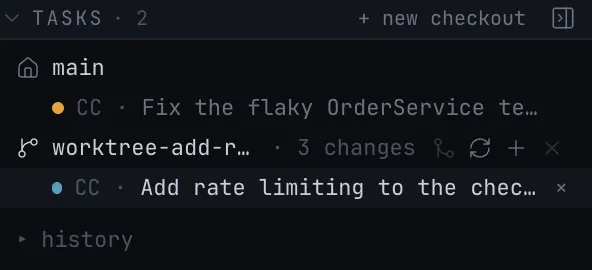
The TASKS section
The side panel lists the main checkout first, then every worktree: its branch, the count of uncommitted changes, commits ahead and behind, and who made it — Robion for a task, the Steward, another agent, Claude Code itself or you by hand. Under each row sit its tasks with their state.
A task follows its session: when an agent moves into a worktree mid-session (“do it in a new worktree”), its row moves under that checkout with the next hook Claude Code sends. Worktrees with no task that are merged or older than 14 days gather under “to tidy” for one-click removal.
Review, commit, push
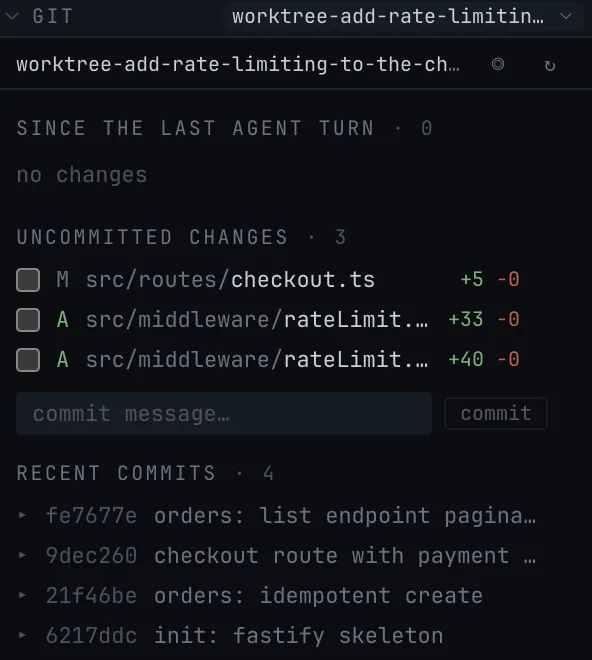
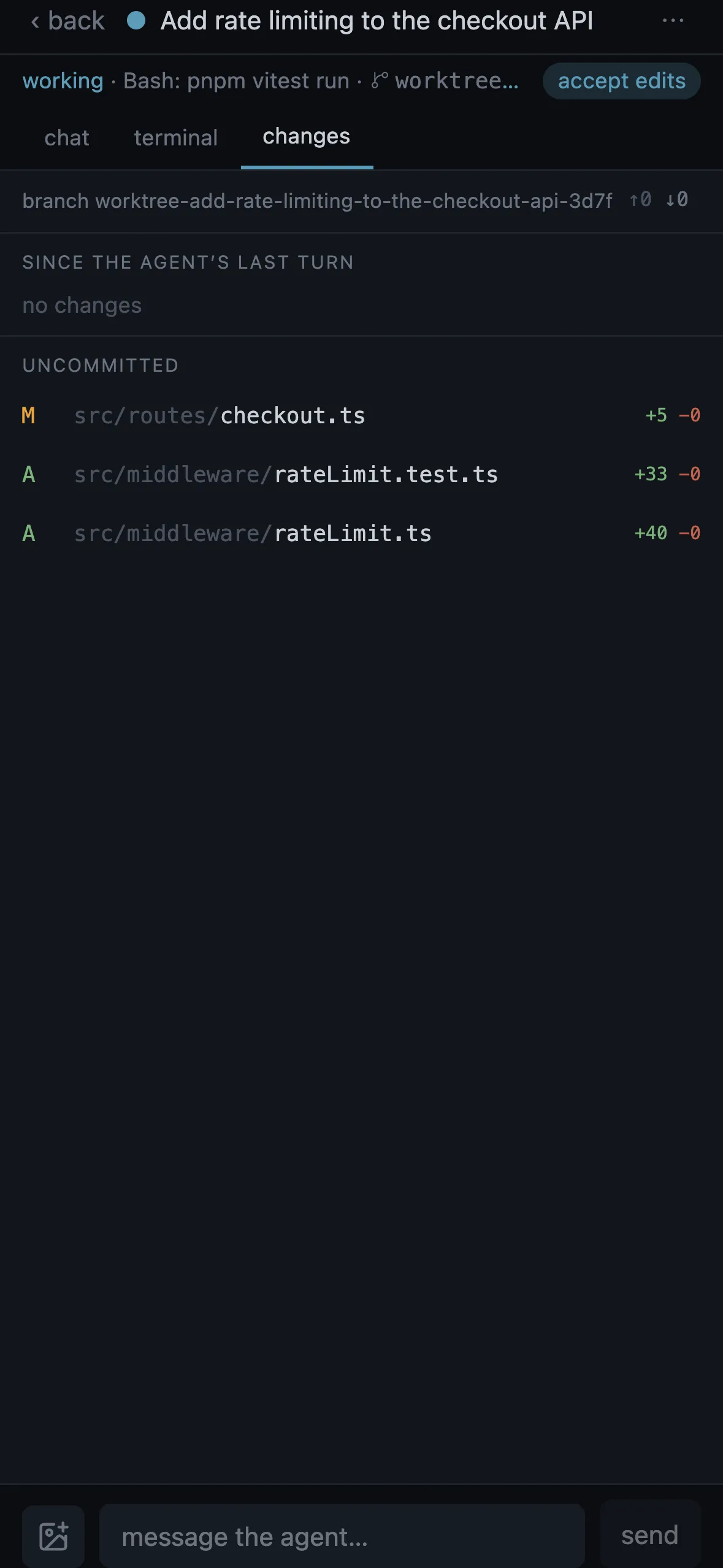
The GIT section shows the changes since the last agent turn. Checkboxes stage files, one field commits them in the task’s checkout — never an amend, never an automatic add — and push asks once before it sends, never with force. Git’s answer stays in the panel as text.
A diff is a panel next to the terminal; a selected line range goes back to the agent as a prompt. When the agent thinks it is done it calls request_review, which flags the GIT section and opens the diffs for a few files.
Merge with four strategies
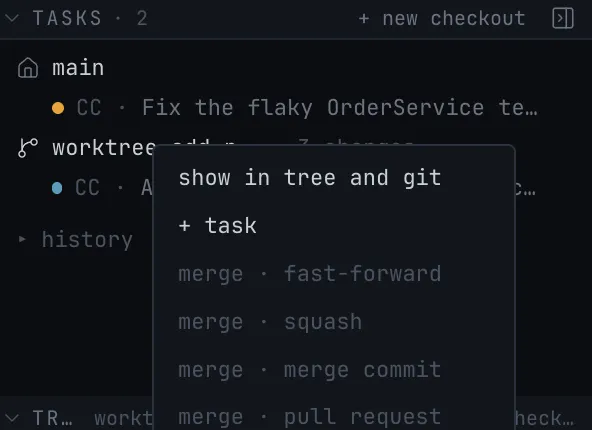
Fast-forward, squash, merge commit or a pull request on the host with the review notes as its body. Three checks must tick first: the worktree is clean, no agent is running there, and nothing overlaps with uncommitted changes in main. A branch behind main is rebased first.
A conflict stops in the worktree, never in main, with four ways out: abort the rebase, open a shell, let an agent resolve it (a task with the prompt “resolve every conflict keeping both intents, run the tests, do not push”), or continue once the files are resolved. Robion never resolves a conflict itself.
What the agent cannot do
No agent tool merges, updates or removes a checkout. Those are your clicks in the side panel or on the phone, where the same Merge into main sheet names the blockers before it offers a strategy. The agent writes; you integrate.
Questions
- Do I need to set up worktrees myself?
- No. Robion creates .claude/worktrees/<name> on branch worktree-<name> and starts Claude Code there with --worktree. Worktrees you or Claude Code made by hand appear in the same list.
- Can two agents work in the same checkout?
- In the main checkout, yes — that is the quick task. Every own-worktree task is isolated, and tasks started by automations or the Steward always take a worktree.
- What happens to unpushed work when I remove a worktree?
- “Remove” is offered only for a merged, clean worktree. Otherwise the action is “discard…” and says how many unmerged commits and changed files would be lost.
- Does Robion resolve merge conflicts?
- No. A conflict stops in the worktree with abort, open a shell, let an agent resolve it, or continue. Main is never left half-merged.
- Does it open pull requests?
- The pull request strategy pushes the branch and opens a PR or MR on the host, with the review notes as its body. Fast-forward, squash and merge commit happen locally.
In the manual
- Checkouts — Git worktrees as checkouts: main vs own worktree, the TASKS section, update, merge, remove, tidy, conflicts, what the agent can and cannot touch.
- Tasks — A task’s life: new task or terminal, permissions and questions, states, splits, options, parking and resuming, ending, timeline, cost.
- Panels — Every panel: files and the editor, diff, GIT, web preview and the element picker, 3D model and customizer, media, LOG, controls, activity, statistics, Jira, MCP.
Try it on your own projects.
free · signed & notarized · updates itself